Artificial Intelligence & Automation
difficulty
How to Build MCP Agents: A Step-by-Step Guide
Master how to build MCP agents with our comprehensive guide. Learn AI agent development, MCP protocol implementation, and best practices.
M
Muhammad Aamir Yameen
11-24-2025
13 mint read

Introduction
How to Build MCP Agents: A Step-by-Step Guide is essential knowledge for developers entering the AI agent development landscape in 2025. The Model Context Protocol implementation has revolutionized how we build AI agents with MCP, enabling seamless integration between language models and external tools. This comprehensive guide will walk you through the complete process of how to build MCP agents, from understanding the MCP protocol tutorial basics to deploying autonomous AI agents that can transform your workflows. Whether you're exploring AI agent frameworks or diving into MCP server setup, this guide covers everything you need to succeed.
Understanding the Model Context Protocol
Before diving into how to build MCP agents, it's crucial to understand what the Model Context Protocol actually is. The MCP protocol is an open standard developed by Anthropic that standardizes communication between AI models and external data sources.
Think of MCP as the "USB-C for AI integrations" – it provides a universal connection method that works across different platforms, models, and services. This standardization eliminates the need for custom integrations for every tool or data source you want to connect.
What Makes MCP Special?
The MCP protocol benefits are transformative for AI agent architecture. Unlike traditional approaches requiring custom integrations for each service, MCP provides a universal connector.
Key advantages include:
- Standardization: One protocol for all AI integrations
- Modularity: Easy to add or remove capabilities without rebuilding
- Scalability: Works from simple tools to complex enterprise AI solutions
- Interoperability: Compatible with multiple AI agent frameworks
- Security: Built-in authentication and access controls
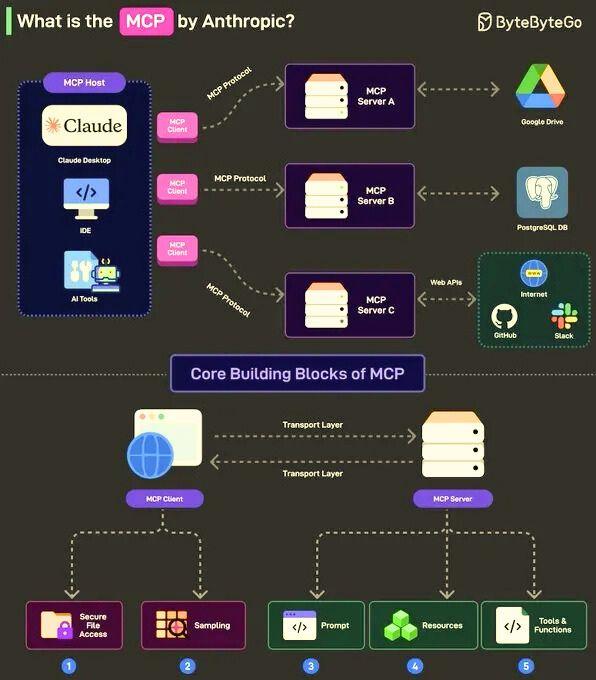
When learning how to build MCP agents, understanding this architecture is your foundation. The protocol separates concerns cleanly: MCP servers expose tools and data, while MCP clients consume these capabilities through a standardized interface.
Core Components of MCP Architecture
To successfully implement an AI agent development guide, you need to understand the three-layer architecture:
MCP Hosts: These are applications like Claude Desktop, VS Code, or custom apps that want to use AI capabilities. The host manages the overall environment.
MCP Clients: Protocol clients that maintain one-to-one connections with servers. They handle the communication between your host application and MCP servers.
MCP Servers: Lightweight programs that expose specific capabilities like database access, API integrations, or file system operations. Each server focuses on a specific integration point.
This separation allows you to build modular, maintainable systems where components can be upgraded or replaced independently.
Prerequisites for Building MCP Agents
Before starting your MCP integration tutorial journey, ensure you have:
- Python 3.10+ or Node.js 18+ installed
- Basic understanding of API concepts and JSON-RPC
- Familiarity with async programming patterns
- Access to an LLM API (OpenAI agents SDK, Anthropic, or alternatives)
- A code editor like VS Code with MCP support
The MCP Python SDK and TypeScript SDK are your primary tools. Both provide robust frameworks for MCP server setup and MCP client configuration, handling protocol complexities automatically.
Step 1: Setting Up Your Development Environment
The first practical step in how to build MCP agents is proper environment setup. This ensures smooth development and testing.
For Python Developers
Create a dedicated workspace for your MCP server development:
- Set up a virtual environment to isolate dependencies
- Install the MCP package and your preferred LLM SDK
- Configure your IDE with Python extensions for better development experience
- Set up environment variables for API keys securely
For TypeScript Developers
Initialize your TypeScript project properly:
- Create a new Node.js project with proper typing
- Install the Model Context Protocol SDK
- Add development dependencies for testing
- Configure tsconfig.json for optimal development
This foundation is critical for successful MCP server development. The SDK handles low-level protocol details, allowing you to focus on building valuable functionality for your autonomous AI agents.
Step 2: Understanding MCP Tools and Resources
How to build MCP agents effectively requires understanding the difference between tools, resources, and prompts.
Tools are functions your AI agent can execute. They're like giving your agent hands to perform actions. Examples include sending emails, querying databases, or creating calendar events.
Resources are data sources your agent can read. Think of these as reference materials – documents, database contents, or API responses that provide context.
Prompts are reusable templates that guide agent behavior. They help maintain consistency in how your agent responds to specific scenarios.
For effective AI workflow automation, combine all three types strategically.
Step 3: Creating Your First MCP Server
Now we reach the core of how to build MCP agents: creating an MCP server that exposes capabilities to your AI agents.
Basic Server Structure
Your MCP server needs three key components:
Server Initialization: Set up the MCP server instance with proper configuration. This includes naming your server, setting version information, and defining capabilities.
Tool Registration: Define what your agent can do. Each tool needs a clear name, description, and parameter schema so the AI understands when and how to use it.
Transport Layer: Choose between STDIO (for local integrations) or HTTP with Server-Sent Events (for remote deployments). STDIO is simpler for development, while HTTP+SSE enables cloud deployment.
Example: Building a Weather MCP Server
Let's walk through a practical example relevant to how to build MCP agents.
Your weather server would expose two tools:
Get Current Weather: Accepts a location parameter and returns current conditions. The tool description should clearly explain what it does so the AI knows when to invoke it.
Get Forecast: Takes location and number of days as parameters, returning future weather predictions.
The MCP server setup handles the protocol communication, while your code focuses on the actual weather API integration. This separation of concerns is what makes MCP tools and resources so powerful.
Step 4: Integrating with AI Models
After setting up your MCP server, the next step in this AI agent development guide is connecting it to language models.
Using OpenAI Agents SDK
The OpenAI agents SDK provides excellent MCP support. Configure your agent to discover and use MCP tools automatically through the function calling mechanism.
Your agent initialization should specify:
- Which MCP servers to connect to
- Authentication credentials if needed
- Tool execution permissions and safety constraints
Claude Desktop MCP Integration
For Claude Desktop MCP integration, add your server configuration to the Claude Desktop settings. This allows Claude to discover your tools automatically when you start conversations.
The integration is seamless – Claude sees your MCP tools as native capabilities and uses them naturally in conversation flow.
Alternative Frameworks
Other AI agent frameworks like LangChain, Microsoft Agent Framework, and LlamaIndex also support MCP. Each has slightly different configuration approaches but follows the same core principles.
Step 5: Implementing Agent Logic and Workflows
How to build MCP agents that actually solve problems requires thoughtful workflow design.
Planning Agent Behavior
Start by defining your agent's purpose clearly:
- What problems does it solve?
- What information does it need access to?
- What actions should it be able to perform?
- What are the safety boundaries?
This planning phase is crucial for successful AI agent architecture. Don't skip it – poorly designed agents lead to unpredictable behavior.
Building Agent Workflows
Structure your agent's decision-making process:
Perception: How does the agent gather information? Which MCP resources does it query?
Reasoning: How does the agent decide what actions to take? This is where your LLM's capabilities shine.
Action: Which MCP tools does the agent invoke? Ensure each tool call is validated and logged.
Learning: How does the agent improve over time? Consider implementing feedback loops.
Step 6: Adding Memory and Context Management
Advanced MCP integration tutorial topics include persistent memory for your autonomous AI agents.
Short-term Memory
Maintain conversation context within a session. The MCP protocol supports passing conversation history to help agents maintain coherence.
Long-term Memory
For enterprise AI solutions, implement persistent storage:
- Save important facts the agent learns
- Store user preferences and customizations
- Keep audit logs of agent actions
- Enable knowledge retrieval for future sessions
This transforms simple chatbots into truly intelligent AI agent best practices implementations.
Step 7: Testing and Debugging Your MCP Agent
Thorough testing is essential when learning how to build MCP agents that work reliably.
Unit Testing MCP Tools
Test each tool independently:
- Verify correct parameter handling
- Check error conditions and edge cases
- Ensure proper response formatting
- Validate authentication and permissions
Integration Testing
Test the complete flow:
- Agent receives user request
- Agent queries appropriate MCP resources
- Agent invokes correct MCP tools
- Results are properly formatted and returned
Using MCP Inspector
The MCP Inspector tool helps debug server issues. It lets you manually invoke tools and inspect responses, making troubleshooting much easier.
Step 8: Deploying Your MCP Agent
Moving from development to production requires careful planning for your MCP server setup.
Local Deployment
For personal use or small teams:
- Run MCP servers on the same machine as your client
- Use STDIO transport for simplicity
- Manage with process managers like systemd or pm2
Cloud Deployment
For enterprise AI solutions:
- Deploy MCP servers to cloud platforms (AWS, Azure, GCP)
- Use HTTP+SSE transport for remote access
- Implement proper authentication (OAuth 2.0)
- Set up monitoring and logging
- Configure auto-scaling for high availability
Security Considerations
Never compromise on security:
- Use environment variables for sensitive data
- Implement rate limiting on tool execution
- Validate all inputs thoroughly
- Audit agent actions regularly
- Restrict tool permissions appropriately
Advanced Topics in MCP Agent Development
Once you've mastered the basics of how to build MCP agents, explore these advanced concepts:
Multi-Agent Systems
Build systems where multiple specialized agents collaborate. Each agent has its own MCP servers and tools, but they coordinate to solve complex problems.
Custom AI Agent Frameworks
Extend existing frameworks or build your own. The MCP protocol's openness allows deep customization for specific use cases.
Hybrid Architectures
Combine MCP agents with traditional software systems. Use agents for intelligent decision-making while keeping critical operations in conventional code.
Real-World Use Cases
Understanding practical applications helps solidify how to build MCP agents effectively:
Customer Support Automation: Agents with access to knowledge bases, ticketing systems, and customer databases provide intelligent support.
Development Assistants: Agents connected to GitHub, documentation, and testing tools help developers work faster.
Data Analysis Agents: Connect to databases, visualization tools, and reporting systems for autonomous analysis.
Content Creation: Agents with access to research tools, image generators, and publishing platforms streamline content workflows.
Common Challenges and Solutions
Every developer faces obstacles when learning how to build MCP agents:
Challenge: Agent uses wrong tools or makes illogical decisions.
Solution: Improve tool descriptions and add examples. Clear, detailed descriptions help LLMs understand tool purposes.
Challenge: Slow response times from MCP servers.
Solution: Optimize tool implementations, add caching, and use asynchronous operations where possible.
Challenge: Authentication failures with remote MCP servers.
Solution: Implement proper OAuth flows and secure token management.
Challenge: Agent exceeds rate limits or costs.
Solution: Add input validation, implement caching strategies, and set usage quotas.
Best Practices for MCP Agent Development
Follow these AI agent best practices for success:
- Start simple – build basic functionality before adding complexity
- Document everything – clear documentation helps both humans and AI understand your tools
- Test thoroughly – automated testing catches issues early
- Monitor continuously – track agent behavior in production
- Iterate based on feedback – agents improve through refinement
- Prioritize security – never compromise on safety and data protection
- Keep tools focused – each tool should do one thing well
- Version your servers – enable smooth updates without breaking clients
The Future of MCP and AI Agents
The Model Context Protocol implementation is rapidly evolving. Expect these trends:
- Broader adoption across AI platforms and tools
- Enhanced security features and enterprise controls
- Better developer tools and debugging capabilities
- Standardized agent patterns and libraries
- Integration with emerging AI technologies
Staying current with these developments ensures your AI workflow automation remains cutting-edge.
Frequently Asked Questions
What is the difference between MCP agents and regular chatbots?
MCP agents can interact with external tools and data sources through standardized protocols, while regular chatbots are limited to their training data. How to build MCP agents involves connecting language models to real-world systems, enabling actions like database queries, API calls, and file operations. This makes MCP agents far more capable for practical tasks than simple conversational chatbots.
Do I need programming experience to build MCP agents?
Yes, building MCP agents requires programming knowledge, particularly in Python or TypeScript. You need to understand API concepts, async programming, and software architecture. However, the MCP protocol tutorial resources and frameworks simplify much of the complexity. If you're comfortable with basic coding, the MCP Python SDK and available documentation make the learning curve manageable for the AI agent development guide process.
Which AI model works best with MCP agents?
Multiple models support MCP integration, including Claude (via Claude Desktop MCP integration), GPT-4 (through OpenAI agents SDK), and open-source alternatives. The best choice depends on your needs: Claude excels at tool use and reasoning, GPT-4 offers broad capabilities, while open-source models provide cost advantages. Most AI agent frameworks support multiple models, letting you switch based on requirements for your autonomous AI agents.
How much does it cost to run MCP agents in production?
Costs vary based on your setup. Running local MCP servers is free except for LLM API calls, which range from $0.01 to $0.10 per thousand tokens depending on the model. Cloud deployment adds hosting costs ($20-200/month for basic setups). Enterprise AI solutions with high usage might spend $500-5000+ monthly. Start small with the MCP server setup, monitor usage, and scale based on actual needs to optimize your AI workflow automation costs.
Conclusion
Learning how to build MCP agents opens doors to creating powerful, context-aware AI systems that can interact with real-world tools and data. This step-by-step guide has covered everything from understanding the Model Context Protocol implementation to deploying production-ready autonomous AI agents.
The journey from basic MCP protocol tutorial concepts to advanced AI agent architecture takes practice, but the MCP framework makes it accessible. Start with simple MCP server setup projects, gradually add complexity, and always follow AI agent best practices for security and reliability.
Whether you're building with the OpenAI agents SDK, exploring Claude Desktop MCP integration, or using other AI agent frameworks, the principles remain consistent. Focus on clear tool descriptions, robust error handling, and thoughtful workflow design.
The future of AI development lies in agents that can autonomously interact with systems while maintaining safety and reliability. By mastering how to build MCP agents, you're positioning yourself at the forefront of this transformation in enterprise AI solutions and AI workflow automation.
Ready to start your journey? Visit StacksGather.com for more tutorials, code examples, and community support.
Need this built for your business?
Turn this into a real solution
We build AI systems, SaaS platforms, mobile apps & custom software. Let's discuss your project — free consultation.
M
Muhammad Aamir Yameen
Software Engineer
Need this built?
We build AI systems, SaaS platforms, mobile apps & automation. Free consultation.